
Confirmed capabilities
- Limit orders: Yes on BSC.
- Copy trading: Yes on BSC.
- Multiple wallets: Yes on BSC.
- Trading presets: Yes on BSC.

Copy trading and limit orders documented for BSC. Review the Telegram + Extension workflow, costs and controls before connecting funds.
These facts use BNB-specific evidence or explicitly approved product-wide information. “Not verified” is distinct from “No”.
| BSC feature | Bloom |
|---|---|
| Platform trading fee | 1% standard platform fee; 0.9% referred discount; network/protocol/bridge costs separate |
| Interface | Manager web/PWA, chain-specific Telegram bot and unified browser extension |
| Wallet model | Custody architecture unconfirmed; generated/imported wallets do not establish exclusive user key control |
| Limit orders | Confirmed at supported venues |
| Copy trading | Yes |
| Multiple wallets | Yes |
| Token discovery | Integrated |
The recorded gross platform trading fee is 1%. This is separate from network gas, liquidity-pool fees, price impact and token taxes.
Rewards and referral programmes can have eligibility rules. The product-wide reward model is cashback; a BNB net fee or cashback rate is not calculated without a confirmed chain-specific schedule. Understand total trading costs →
Links may be affiliate links. Disclosure
Only BNB venue lists and execution mappings are used here.
| BSC feature | Bloom |
|---|---|
| Workflow orientation | Execution-focused |
| Gas fee control | Manual |
| Slippage control | Manual |
| Trading presets | Yes |
| Automated sells | Yes |
| DEX integrations | PancakeSwap v2, PancakeSwap v3, Uniswap v2, Uniswap v3, PancakeSwap Infinity |
| Launchpad coverage | Four.meme · X Mode · Flap |
| Internal wallets | Yes |
| Reward model (product-wide) | Cashback |
| Referral model (product-wide) | Multi Level |
A wallet label describes the recorded product model, not an independent security audit.
Check who can access signing keys, whether export is available and how recovery works. Keep enough BNB for gas. Avoid assuming that MEV protection prevents malicious token contracts or guarantees a successful fill. Read the wallet and security guide →
Compare against other active BNB tools.
The current record marks the entity, trading service and BNB chain status as active. This is source-based availability, not a live trade or uptime test.
Yes. This answer is scoped to BNB; other chains can differ.
Use the verified entry link, select BNB Smart Chain in the product and read its setup instructions. Check wallet recovery and the current fee quote before committing funds.
The review date indicates a source check, not a claim that every field was retested on that date.
Reviewed 7 October 2026
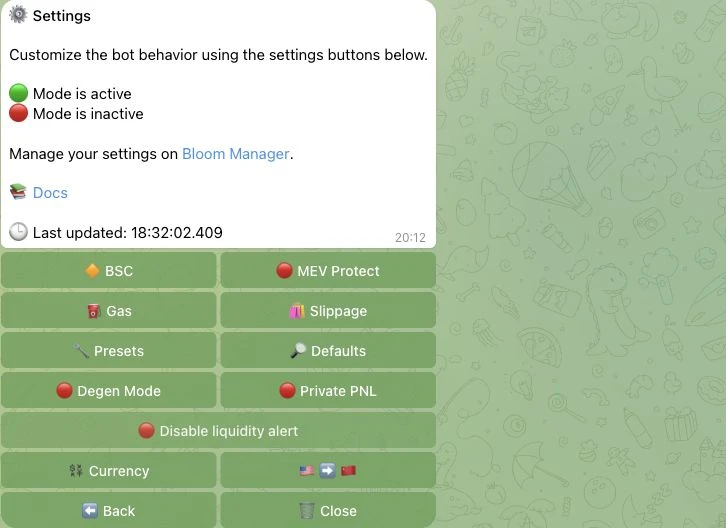
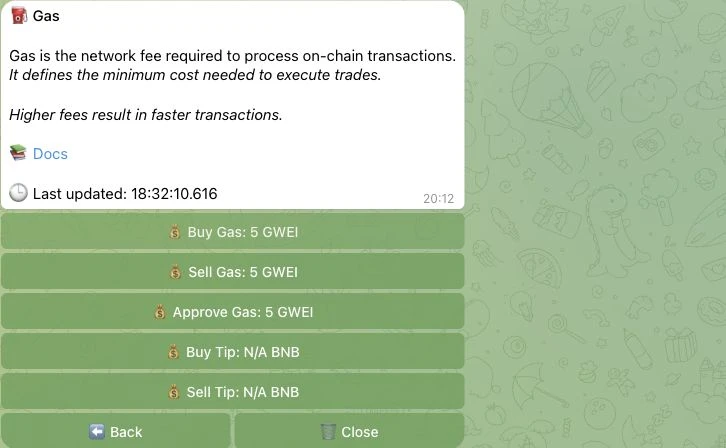
The BSC settings expose distinct buy, sell and approval gas fields and a MEV switch. Documentation describes a BSC bloXroute path when protection is enabled; actual protection and all-chain relay parity were not measured. The quote menu offers the native asset, USDC, USDT and USD1.
Four.meme, X Mode and Flap have confirmed BNB trade/filter roles. Manager Deploy integrates Flap and four.meme for token creation; this native launch role is separate from ordinary trading and AFK filtering. Its current deployment fee is unconfirmed, and an expired zero-fee promotion is not a current price.
Bloom’s standard token buy/sell fee is 1%. Signing up through a referral reduces that platform fee to 0.9%. Network gas, priority fees or validator tips, protocol/DEX costs and bridge fees are separate. Referred cashback is 10% of eligible standard fees; the net result when combined with the discount remains unconfirmed.
BloomEVMbot serves the seven current EVM chains: Ethereum, BNB, Base, HyperEVM, Robinhood, Arc and Ink. Manager is the shared web hub for tasks, wallets, portfolio and chain-scoped history. Its mobile version can be added to the home screen. The unified extension has its own trading overlay; it is more than a link back to Telegram.
Generated/imported multi-wallet workflows are confirmed. Manager supports wallet archive, split and consolidate. The technical custody, exclusive key-control and recovery architecture are unconfirmed; key access is not presented as proof of exclusive custody. The EVM walkthrough was in English; additional EVM interface translations are unconfirmed. Manager Social Tracker translation targets are English and Chinese; these are translation roles, not promises about help/support languages.
Token trading: Four.meme, X Mode, Flap.
AFK platform filtering: Four.meme, X Mode, Flap.
Native token launch: Flap, Four.meme.
The standard referral commission has three layers: 25%, 3% and 2% of the published fee basis. It is a referrer benefit, separate from the trader’s cashback. Higher partner rates and a general cashback maximum are unconfirmed. No combined 0.8% or 0.81% net platform rate is promised.
Allow optional analytics cookies to help us understand how this site is used? We use Google Analytics only with your permission. Privacy notice